Transmittals

All files exchanged with other companies need to be organized in transmittals.
Transmittals are represented by subfolders in the transmittal tree structure.
Each company has it's own transmittal folder structure, always having an Transmittal IN tree and a Transmittal OUT tree, Which have on there turn subfolders.
One subfolder for each transmittal and carrying the same name as the transmittal
The picture showns an example of a transmittal tree structure.
To get transmittal information available in logicDCMS, transmittal folders have to be scanned. To make scanning possible, make sure that the transmittal folders can be found.
In the companies definition form there are fields which must contain references to the transmittal folders on the network.
Transactions
As already explained, all files exchanged with other companies need to be organized in transmittals.
Transmittals are the containers for the files and are represented by subfolders in the transmittal tree structure on the network.
Transmittals are exchanged between two companies and so are the files (representing documents) referenced in these tranmittals.
The process of exchanging a file between two companies is called a transaction in logicDCMS.
All transactions are registrated and stored in the logicDCMS database.
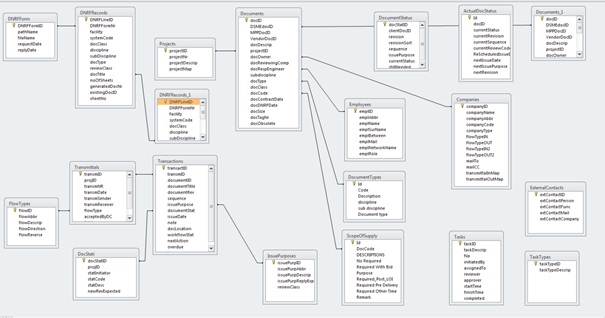
In fact, the documents table and the transactions table together are the foundation for the whole database.
A lot of other tables each for a special purpose have a relation to these crucial documents and transactions tables, but are not in the lead.
All information being represented by forms is devired from these two tables and completed with information from other tables.
Below an impression from the logicDCMS database architecture. Not all tables are shown, but the most important one's are.