Document files in logicDCMS are primary organized in transmittal folders.
For each external company, being the client, a vendor, a manufacturer or an inspection company, a separate transmittal folder structure is created.
These folder structures contain all files exchanged, including native files when applicable. Also the transmittals itself are stored here.
Besides that, there will normally be a 'working' environment', organized by document type, by engineer, by document category or by any other division.
All files in these folders can be linked to logicDCMS by performing a 'filescan'.
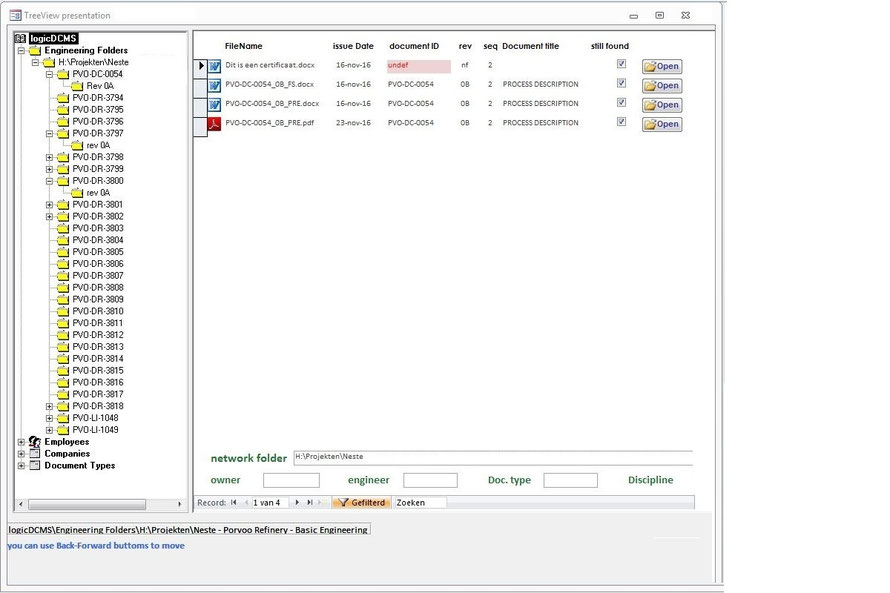
After the filescan all these files can be viewed from within logicDCMS in the same hierarchical structure as used on the network.
Advantage above the traditional way of using Windows Explorer to navigate through the network folders is that by using logicDCMS, additional information will be available directly for the
selected document or file. Document titles are shown in the right pane, meta-data about the document is visible at the bottom of the right pane. See the picture below for an impression.
Metadata related to documents is stored in the logicDCMS database.