
Introduction
Concept of logicDCMS ?
logicDCMS is a Document Control and Management System for medium size projects.
It is especially useful in the engineering and construction phase of projects, to support the process of exchanging documents between the company using logicDCMS, the client for the project and
third party companies ( suppliers, vendors ).
Actual file storage is done on the companies internal network. There is no 'black-box' in logicDCMS containing all the files. However, documents or files can be opened directly from logicDCMS.
Synchronizing the network contents with logicDCMS can be done easily.
All meta-data and runtime information related to all project documents is stored in the database.
logicDCMS is built as a standalone database application in Microsoft Access.
The application consists of a separate front-end and a back-end (database) per project.

The concept of a database
A database is a structured environment in which data is stored unambigiously
In general, a database uses tables to store data. Tables exist of fields and records, comparable with f.i. Excel sheets.
By defining relations between tables, so called queries, a structured collection of data arises.
Each entity, like f.i. a document title is stored in only one place insite the database.In this way inconsistency is prevented.
From organized data, information can be obtained. Despite the fact that queries can be directly used to display information, in practice forms and reports are created for that purpose.
For which kind of organizations
logicDCMS is in particular useful to organizations :
- which are currently used to store all there documents in traditional network folders and have no intention to change that.
- which are used to administrate project documents in separate lists f.i. in Excel files or sheets.
- Which don't have the financial capabilities to invest in an expensive of-the-shelf or customized professional Document Control and Management System.
- which have a positive intention of improving efficiency and reliability concerning their document handling process.
For which users
logicDCMS is useful to:
- Document Controllers, to support in handling received documents, distribute documents, monitor document statusses, etc
- Engineers, to keep track of the documents they are responsible for
- Supervisors, project leaders etc, to keep track of the progress in the project's document creation and approval
Document distribution streams
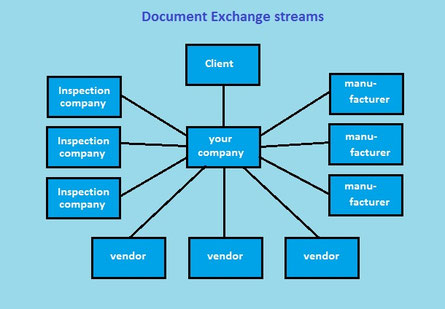
logicDCMS is designed from the perpective that the company using logicDCMS has the role of being an EPC contractor or (main)supplier.
This company exchanges documents with the client for the project and with vendors.
In general, exchanging documents with the client is the most important stream.
But exchanging documents with suppliers, vendors and manufacturers is also possible.
Finally also distribution of (deliverable) documents to inspection companies is facilitated.
The picture at the right shows all possible document exchange streams.
In case your company itself has the role 'client', logicDCMS can also be used, but only part of the available distribution structure will be used then.
Import data into logicDCMS
The following data can be imported in logicDCMS from external sources or by automated processes:
- Document numbers, titles, document owner names, first issue dates (from Supplier and Vendor document lists)
- Document revision information, including information about sender/receiver, transmittals and issue dates
- filenames and location information of project network folders and their contents
- e-mails received from client or vendors
Above mentioned data can be imported by automated processes. Any other data crucial for configuring logicDCMS or the current project can be imported by entering values manually in specific
forms.
The most important are:
- Project configuration parameters
- Information about companies involved in the project
- Information about employees on the project
- Document types
- Scope of Supply (with document classification by the attribute SoS document code)
- Project specific issue purposes
- Project specific review codes
- Behaviour rules: How to determine next revision and issue purpose
- pre-defined mail messages
- Filter criteria for pre-defined reports
Storage of files and document metadata
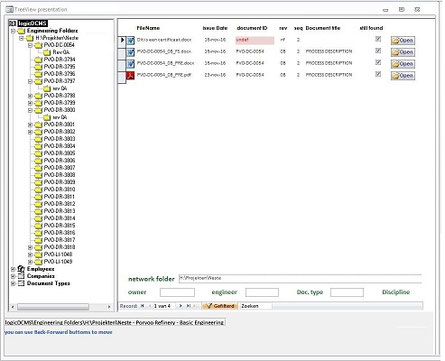
Document files in logicDCMS are primary organized in transmittal folders.
For each external company, being the client, a vendor, a manufacturer or an inspection company, a separate transmittal folder structure is created.
These folder structures contain all files exchanged, including native files when applicable. Also the transmittals itself are stored here.
Besides that, there will normally be a 'working' environment', organized by document type, by engineer, by document category or by any other division.
All files in these folders can be linked to logicDCMS by performing a 'filescan'.
After the filescan all these files can be viewed from within logicDCMS in the same hierarchical structure as used on the network.
Advantage above the traditional way of using Windows Explorer to navigate through the network folders is that by using logicDCMS, additional information will be available directly for the
selected document or file. Document titles are shown in the right pane, meta-data about the document is visible at the bottom of the right pane. See the picture at the right for an
impression.
Metadata related to documents is stored in the logicDCMS database.
Document progress monitoring
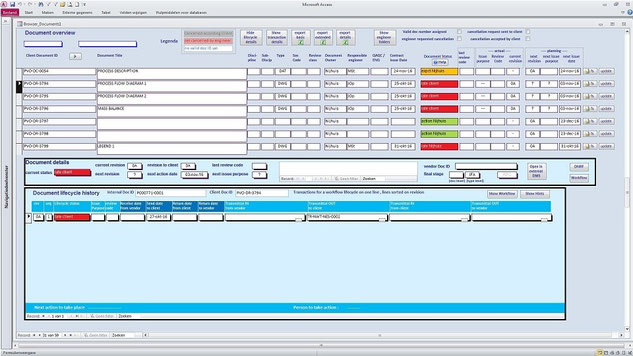
Each document will go through a lifecycle, from creation until final approval. During this lifecycle multiple revisions may be created.
The document will go through several stages, each with a specific purpose. F.i. after creation of the first revision it will have to be reviewed or approved.
Later on it might be released for construction, or it reaches the stage 'as Built'.
With logicDCMS it is possible to follow and monitor a document in it's lifecycle. It will always have a status indicating the progress in the lifecycle and the revision history shown in detail
when the document has been exchanged between parties.
The picture show all information about documents.
Information is organised in a so called master-detail overview:
- The upper part of the screen shows a list of all documents with general information and current revision status detailsc
- the center of the screen shows more lifecycle details for the selected document
- The lower part show all revision details for the selected document
Export information from logicDCMS
From multiple 'views' in logicDCMS it is also possible to create an Excel file.
Many users in a project are used to work with lists, most of the time realized in an Excel sheet.
Excel lists are very flexible in filtering and sorting of data, which makes it a popular tool.
The document status overview is one of the views which can be exported to Excel.
A choice can be made between a straight list containing only basic status information about each document, until a fully extended list with all revision details.
But also a lot of other logicDCMS views can be used as the base for an export to Excel.
Deliverable/non-Deliverable documents
logicDCMS is capable of handling all kind of documents. Primary it is focused upon 'deliverable' documents. These are the documents which need to be provided to the client of the project, as they
are requested in the project contract, MR (Material Requisition) or SOS ( Scope of Supply ).
In general, deliverables are issued in pdf format, sometimes accompanied by the same files in native format. Non-deliverables are the documents not being shared with the client. Often received
vendor documents are in this category. They are needed for the project, but don't have to be seen by the client, or they have to be edited or combined into other documents first.
Vendor documents
Vendor documents can be of type deliverable and non-deliverable.
Deliverables will have to be forwarded to the client after an internal check.
Non-deliverables will not be shared with the client. They are needed for the project, but are not required by the client, or they have to be used as the base for other documents which are of type
deliverable.
Also these non-deliverables can be registered in logicDCMS. Complete independant lifecycles for vendor documents can be used, as long as these documents can at least be identified by predefined
document numbers.
In case documents are not identified by any agreed document number, they still can be imported in the system, but they will only be visible in the transmittal overviews and will not have a
status.
Workflows
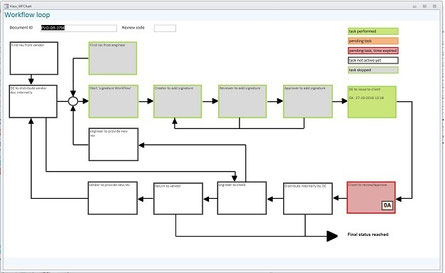
Documents in a lifecycle go through predefined processes. Documents will be created or edited, will be reviewed or approved, wiil be exchanged between people or companies etc.
Most of these steps will be repeated in a predefined sequence, if well organized even defined in workprocesses.
logicDCMS can support in these workprocesses. Available is a 'workflow' module.
Following tasks can be executed by using this module:
- Internal document signing process: Users can put their (electronic) signature on document. (sequencial process for 3 signatures)
- Prepare for issuing document(s) to client, including automatic creation of transmittal
- Handle returned documents from client including automatic internal distribution and notifications
- Handle received vendor documents including automatic internal distribution and notifications
- Return vendor documents with automacally created transmittal including an e-mail with attachments
Employees are supported with 'task' lists and e-mail notifications.
A grafical presentation of the progress in a documents's lifecycle is also available.
Creating e-mails and reading e-mails
LogicDCMS is capable of creating e-mails, which can be send by using Outlook or Gmail.
E-mail messages can be created when using the workflow module and can be internal e-mails or e-mails to the client or vendors.
The mail messages are pre-defined messages in HTML format. Customizing of these messages is possible. They are kept in the logicDCMS database.
Incoming mails ( Outlook only ! ) can also be saved in the database and if they are according predefined layouts can even be handled automatically.
The originator can be recognized and attached documents are automatically distributed internally.
(in case of ZIP files these need to be unzipped in the transmittal folders manually)