Using the workflow module
With the workflow module, new workflow tasks can be created and existing workflow tasks can be monitored or executed.
For creating a new workflow go to:
- As a Document Controller : Navigate to Document Control menu -> Workflow handling -> Start new workflow
- As an engineer : Navigate to Engineer menu -> Start new workflow
Following form will appear
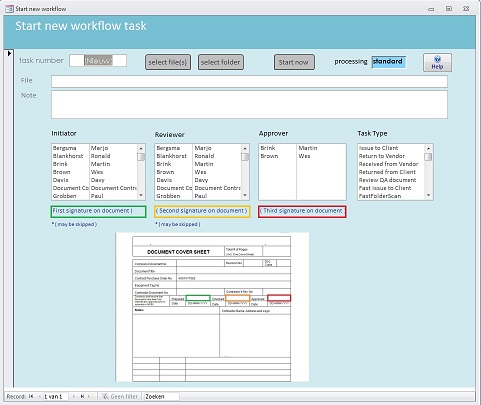
Following tasks can be executed from this form:
- Internal document signing process: Users can put their (electronic) signature on a document. (sequencial process for 3 signatures)
- Prepare for issuing document(s) to client, including automatic creation of transmittal
- Handle returned documents from client including automatic internal distribution and notifications
- Handle received vendor documents including automatic internal distribution and notifications
- Return vendor documents with automatically created transmittal including an e-mail with attachments
Internal document signing process (Started by a Document Controller or engineer)
Assumption is that before a document can be distributed for review / approval it has to be internally checked and signed by three project employees.
Normally the first one to sign is the composer of the document, the second one a collegue on equal level and the third one a manager or process owner.
After opening the screen, start with selecting the document by clicking the select file(s) button and making a selection.
Choose the involved employees to sign. Approver is mandatory, Initiator and Reviewer are optional.
Select the task type Issue to client and click the Start button.
A workflow task will be created and assigned to Document Control (for a pre-check on validity of the document).
Prepare for issuing document(s) to client, including automatic creation of transmittal (Started by Document Controller only )
Collects all documents to be issued, automatically determines the next available transmittal number, create the transmittal with all documents referenced and makes and sends a notification mail,
if applicable with attachments, to the client.
This workflow can be started separately, but is also included as the last part of the previous workflow type Internal document signing process
Handle returned documents from client including automatic internal distribution and notifications (Started by Document Controller only )
Analysis the received transmittal and received documents, saves these in the working environment and informs the responsible engineer(s) by adding a task to their tasklist and optionally by
sending a notification mail.
After opening the form, select the transmittal folder in which the received documents have been stored (use the button select folder)
Select the task type Returned from client and click the Start button.
One or more workflow tasks will be created (one per received document) and assigned to the responsible engineer(s).
Handle received vendor documents including automatic internal distribution and notifications (Started by Document Controller only )
Analysis the received transmittal and received documents, saves these in the working environment and informs the responsible engineer(s) by adding a task to their tasklist and optionally by
sending a notification mail.
After opening the form, select the transmittal folder in which the received documents have been stored (use the button select folder)
Select the task type Received from vendor and click the Start button.
One or more workflow tasks will be created (one per received document) and assigned to the engineer coordinating the documents for this vendor.
Return vendor documents with automatically created transmittal including an e-mail with attachments (Started by a Document Controller or engineer)
workflow to be handled by Document Controllers. Initiated by a vendor coordinator or engineer.
Collects all documents to be returned, automatically determines the next available transmittal number, create the transmittal with all documents referenced and makes and sends a notification
mail, if applicable with attachments, to the vendor.
After opening the form, select the folder in which the document is stored (click the select file(s) button) or select a whole folder with documents (click the select folder
button).
Select the task type Return to vendor and click the Start button.
A workflow task will be created and assigned to Document Control (for a pre-check on validity of the document(s) to be returned).
Viewing and executing workflow tasks
- As a Document Controller : Navigate to Document Control menu -> Workflow handling -> Open tasklist
- As an engineer : Navigate to Engineer menu -> Open tasklist
Following form will appear
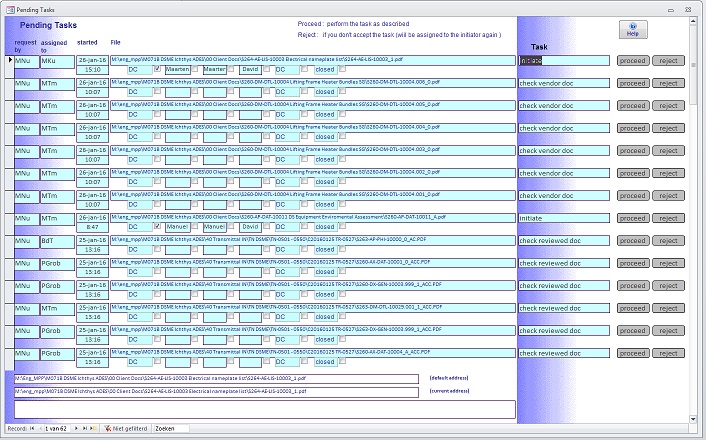
Multiple types of tasks can appear in the list. By clicking on the proceed button, the task can be executed.
The document will be opened. A digital signature can be added or the file can be edited. This depends on external tools available, f.i. Acrobat Professional for editing PDF files.
After closing the file, a pop-up will appear, in which you can confirm that the expected task has been performed or not.
After confirming the task will be removed from the tasklist and will be assigned to the next one in the workflow.
the progress of any workflow is visible in the fields in the center of the form:
- The next one to take action
- Date and time the workflow was started
- Which employees have been assigned this workflow and who has already executed this task
The document controller has additional facilities in monitoring or controlling workflows.
He/she can view tasklists of all employees, can see all tasks including finished tasks and can manually change or quit workflows.
 All mailmessages to a client, vendor or internally are in pre-defined formats.