Register document revisions
After documents have been assigned document numbers and have been imported in logicDCMS it is possible to start with the creation of revisions for any specific document.
Creation of revisions might take place inside your own company or by any vendor.
logicDCMS is based on the concept that all exchanged documents are stored in transmittal folders.
As long as no document file(s) are stored in any transmittal folder, the document has the status idle. A lifecycle record is visible, but is empty.
As already mentioned, Workflows in logicDCMS can be used to automate the exchange process partly.
If workflows are not used, the transmittal folder(s) have to be created and filled with files by hand.
As soon as any transmittal folder is created and filled, it can be 'scanned' :
Navigate to Document Control menu -> Quick Access menu -> Scan transmittal maps
... and select the client or a vendor from the list.
After scanning, the documents can be made visible in the transmittal overview form or one of the lifecycle overview forms.
Using transmittals
A form showing all transmittals can be found here :
Navigate to Document Control menu -> Quick Access menu -> Transmittals overview
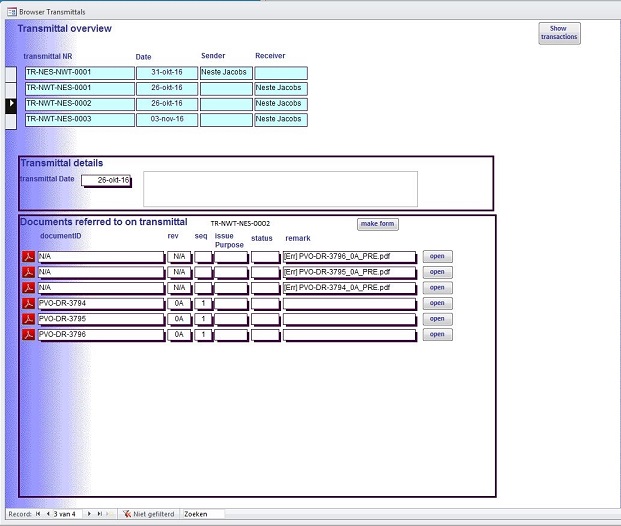
Filtering on the columns Sender and Receiver is possible (use the common MS-Access filtering option from the menubar or quick menu)
The lower part of the form shows the contents of the selected transmittal.
From here the files can also directly be opened by clicking on a open button.
Maintain transactions
Each file exchanged by a transmittal leads to a transaction.
Transactions can also be viewed or edited. Editing might be necessary in case the issue purpose or review code could not be determined automatically.
Navigate to Document Control menu -> Quick Access menu -> Transactions overview for only viewing
Navigate to Document Control menu -> Quick Access menu -> Maintain Transactions for editing transactions
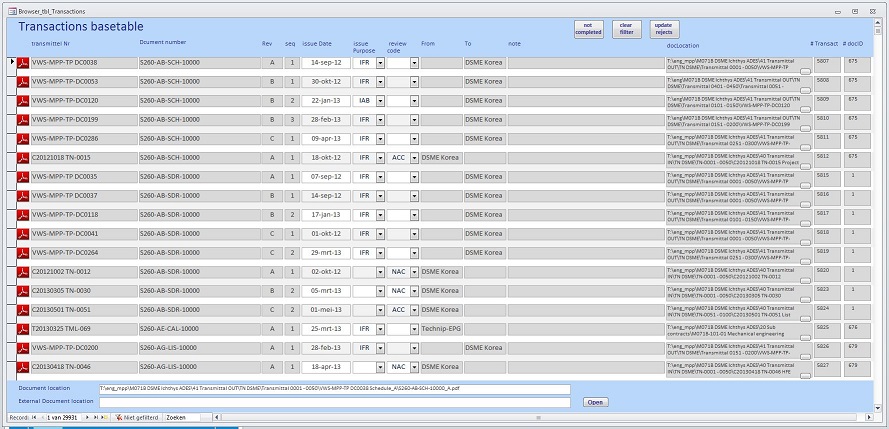
Sorting and filtering on the columns is possible (use the common MS-Access filtering option from the menubar or quick menu)
From here the files can also directly be opened by clicking on a open button.